Catppuccin Light vs Dark Keycaps: Which Set Fits Your Desk?
Petit Keycaps
The choice between Catppuccin Light vs Dark keycaps is not simply “day mode or night mode.” The Light set uses a warm pale base with stronger colored accents. The Dark set places softer pastel accents over a deep navy-purple base. Both can work on a white or black keyboard; they create different relationships with the case, desk, monitor, and room lighting.
If you want the quick answer: choose Light for a pale, airy setup or deliberate contrast on a dark case. Choose Dark for a continuous dark-mode desk or a high-contrast focal point on a light case. Then confirm the kit contains the key sizes your keyboard needs.

Catppuccin Light vs Dark at a glance
| Decision point | Light | Dark |
|---|---|---|
| Overall mood | Airy, warm, playful | Focused, cozy, low-light |
| Best natural pairing | White, silver, cream, pale wood | Black, navy, charcoal, dark wood |
| Contrast pairing | Light caps on a black case | Dark caps on a white case |
| Software-theme cue | Latte and other light themes | Mocha, Macchiato, and Frappé |
| Listed kit size | 142 keys | 145 keys |
| Material and profile | PBT, dye-sub, Cherry profile | PBT, dye-sub, Cherry profile |
The key counts are not a score. Three extra keys are useful only if they are the sizes or legends your keyboard requires. Always compare the kit diagram with the exact layout.
Choose Light when the room is part of the setup
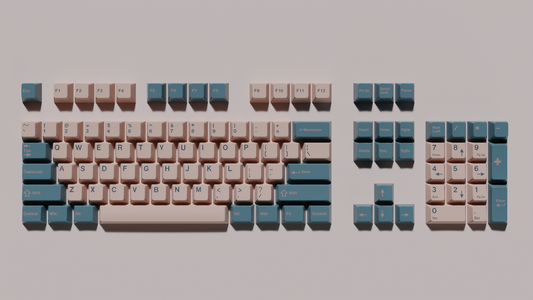
Catppuccin Light works well when daylight, pale walls, and a white or silver computer already dominate the desk. The warm cream alphas avoid the clinical look of pure white, while lavender, blue, pink, peach, and mint accents give the keyboard a recognizable rhythm.
It is also the more dramatic choice on a black case. The case becomes an outline around the caps, and the keyboard reads as one intentional light object rather than disappearing into the desk. That contrast is useful when the rest of the setup is dark but you do not want another navy rectangle below the monitor.

Choose Dark when you want the keyboard to join the screen
Catppuccin Dark is the direct path for a developer who already spends the day in Mocha or another dark flavor. A deep base reduces the visual jump between the editor, terminal, desk mat, and keyboard. The colored modifiers remain visible, but the board does not become the brightest object in the room.
On a black or navy case, the result is continuous and understated. On a white case, the dark caps create a strong border and a more graphic look. Dark is often easier to coordinate with monitor bezels, mice, and audio gear because those products commonly use black or charcoal housings.

Match the software theme without copying it literally
If you use Catppuccin Latte in VS Code, the Light set is the obvious first comparison. If you use Mocha, the Dark set will feel more continuous. That is a useful clue, not a rule. Screens emit light; plastic reflects it. Exact hex values cannot guarantee an exact physical match under every lamp.
The Catppuccin flavors guide explains how Latte, Frappé, Macchiato, and Mocha differ on screen. For a practical editor test, switch flavors using the VS Code setup guide, then place your keyboard under the normal room lighting. Judge the complete scene rather than comparing a product photo with a color picker.
White keyboard, black keyboard, or metal case?
White or cream case
Light produces a seamless, soft look. Dark produces deliberate contrast. If the desk is also white, Dark gives the keyboard a clearer outline; Light keeps the surface calm.
Black or navy case
Dark blends with the case and looks compact. Light makes the key field appear larger and more prominent. Choose based on whether the keyboard should merge into the setup or become its focal point.
Silver or colored metal case
Use the accent keys as the bridge. A silver case usually accepts either set. A purple, blue, or pink case can become too busy if every accent competes; compare the dominant case color with the spacebar and modifiers rather than one novelty key.
Wood case or wood desk
Warm wood tends to make the Light base look creamier and the Dark base look richer. Both can work. Keep the desk mat neutral if the wood grain and keycap accents already provide enough variation.
Room lighting changes the answer
Under daylight, Light preserves separation between the pale alphas and colored modifiers. Dark may reflect blue from the monitor and appear cooler than the product photo. Under a warm evening lamp, Light can shift toward beige while Dark becomes softer and less saturated.
Before choosing, display a Latte screen during the day and a Mocha screen at night. If one mode consistently feels better in the room, its physical counterpart is a sensible starting point. The Catppuccin desk setup guide has additional advice on lighting, mats, wallpaper, and repeating accents without replacing every peripheral.
Compatibility matters more than color
Both sets target multiple common layouts, but “142 keys” or “145 keys” does not automatically cover every board. Verify the switch stem, right Shift, spacebar, bottom-row modifiers, ANSI or ISO Enter, and any unusual navigation keys. Compact 65% and 75% boards deserve the closest inspection.
For a product-specific walkthrough, check whether the set fits your keyboard. The broader keycap compatibility guide explains stems, stabilizers, and unusual layouts. A perfectly coordinated set that cannot cover one stabilised key is still the wrong set for that keyboard.
Which set should you buy?
- Choose Light for Catppuccin Latte, a white or silver desk, bright rooms, or strong contrast on a dark keyboard case.
- Choose Dark for Mocha-style setups, evening use, black or navy peripherals, and a keyboard that should visually join the monitor.
- Choose by compatibility first when your board uses ISO, a compact right Shift, split spacebars, or a nonstandard bottom row.
- Choose the one you notice less if you type for work. The most successful desk setup is the one that becomes familiar rather than demanding attention all day.
There is no objectively better colorway. Light makes the Catppuccin accents feel crisp and cheerful; Dark makes them feel soft and integrated. Pick the relationship you want between the keyboard and the rest of the desk, then verify every unusual key before checkout. If you are buying for someone else, see our guide to Christmas gifts for programmers with mechanical keyboards.