How to Build a Catppuccin Desk Setup That Feels Cohesive
Petit Keycaps
A good Catppuccin desk setup usually needs fewer matching objects than you think. Start with the screen, the keyboard, and the largest surface in view. If those three feel connected, a plain mouse, an existing lamp, and a normal notebook can belong without being replaced.
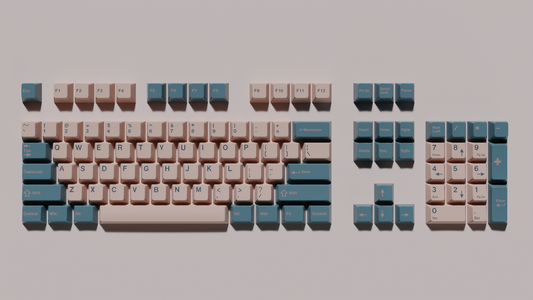
For a light-keycap setup, the easiest direction is a pale keyboard, a restrained background, and one or two repeated accents. The aim is a desk you enjoy working at, not a photograph that only looks coherent with every window closed.
Use your existing desk as the base
Look at the colors you cannot easily change: the desktop, monitor frame, speakers, and computer case. A white desk creates a different starting point from walnut or black laminate. Work with that background before buying another colored accessory.
On a pale desk, a light keyboard can blend into a calm overall surface. On dark wood or a charcoal mat, the same keyboard becomes a focal point. Neither requires every peripheral to match. Repeat a small accent elsewhere—a blue notebook, a muted pink wallpaper detail, or a lavender cable—and let the large neutral areas do the rest.

Choose a screen palette you can live with
Latte is a natural companion to light keycaps because it keeps the screen pale as well. It is not mandatory. Mocha on screen and a light keyboard below can make a deliberate, attractive contrast. Choose the screen flavor based on the applications and room you actually use, then connect the physical objects through the accents.
| Starting point | Screen direction to try | Physical pairing |
|---|---|---|
| White desk, silver laptop, bright room | Latte with a quiet wallpaper | Light keycaps, pale gray mat, one blue or lavender detail |
| Wood desktop, black monitor frame | Latte or a dark flavor, compared in your room | Light keycaps, neutral mat, a small peach or pink accent |
| Mostly dark applications | Mocha, Macchiato, or Frappé | Light keyboard as the focal point, muted accessories nearby |
These are styling suggestions, not official Catppuccin combinations. The Latte guide explains the light flavor, while the hex palette chart gives you exact digital values. A hex code is useful for software; it is not a guarantee that fabric, paint, and plastic will match under your lamp.

Make the keyboard the deliberate color choice
The Catppuccin Light Keycap Set is listed as a 142-key PBT set with dye-sublimated legends and a Cherry profile. Its pale base and colored accents give the desk a recognizable palette without requiring a patterned mat underneath it. The product is a keycap set; a keyboard is not included.
Before ordering, compare the kit contents with your keyboard's actual layout. A percentage label such as “65%” is a starting point, not a complete compatibility check. Look at the spacebar, right Shift, bottom-row modifiers, Enter shape, and any extra navigation keys. Confirm the switch stem and the keycap mounting system too; laptop-style boards are not a safe assumption.
Our keycap compatibility guide explains what to compare. If one unusual key is missing, knowing that before purchase is more valuable than a perfect color match.
Give the accents specific jobs
Choose a main accent and a quieter supporting one. For example, use lavender in the wallpaper and one small object, while the keyboard supplies the rest of the palette. If your mat already has a colorful illustration, keep the wallpaper simpler. If the wallpaper is busy, a plain mat gives your eyes somewhere to rest between screen and keyboard.
A practical way to edit the desk is to remove one item at a time from a photograph taken at your normal seated position. When removing an accessory improves the composition, it was competing for attention. This is more useful than trying to satisfy a strict percentage formula for every color.
Keep essential tools within reach while you do this. A beautiful empty desktop becomes inconvenient if the notebook or charging cable you use every hour has to live in a drawer just to preserve the picture.
Check lighting before buying a different color
Compare the setup in daylight and under the lamp you use in the evening. A warmer bulb can make pale plastic look creamier, while a cooler monitor can make nearby surfaces seem different by comparison. Product photography, your display, and room lighting all influence the color you think you are matching.
Start with simple, steady lighting and modest keyboard lighting if you use it. A strong animated RGB effect can become the dominant palette on the desk, overpowering the subtler keycap accents. If the colors already work with the lighting off, add only enough illumination to serve your actual use.
Build it in three passes
- Change the free things first. Apply a theme, choose a quiet wallpaper, clear unused objects, and tidy the cables you can already route.
- Check the keyboard fit. Verify layout and stems before choosing the light keycap set. Keep the existing case if its neutral color already works.
- Add only the missing link. That may be a plain mat or one small accent. It does not have to be a new monitor, lamp, and mouse.
Use the desk for a few days before adding more. You may discover that the only problem is a reflection in the monitor or a mouse area that is too small. Those deserve attention before another decoration.
Can a Catppuccin desk mix light and dark?
Yes. A dark screen and light keyboard can share the same accent family while serving different practical needs. Repeat a color in two visible places and keep the surrounding surfaces restrained. Consistency does not require every object to have the same background color.
Does everything need to be an exact palette match?
No. Use the official colors for digital elements when convenient, and judge physical objects together under your own lighting. A desk that feels balanced in person is more useful than a collection of individually “correct” colors that compete when placed side by side.